Web Frameworks [OGI06i]
06. Web APIs
06.1
Web API Conventions
Recap
-
You remember …
- how to design the Web API end points taking into account resource hierarchy and consistency
- you should only use GET-parameters for filtering, sorting, pagination and passing a PK
- when to accept which HTTP verb
- when to return which HTTP status code
- we'll be using JSON, both in the response and in the request body
06.2
Web APIs Introduction
Before we start: Tools & JSON
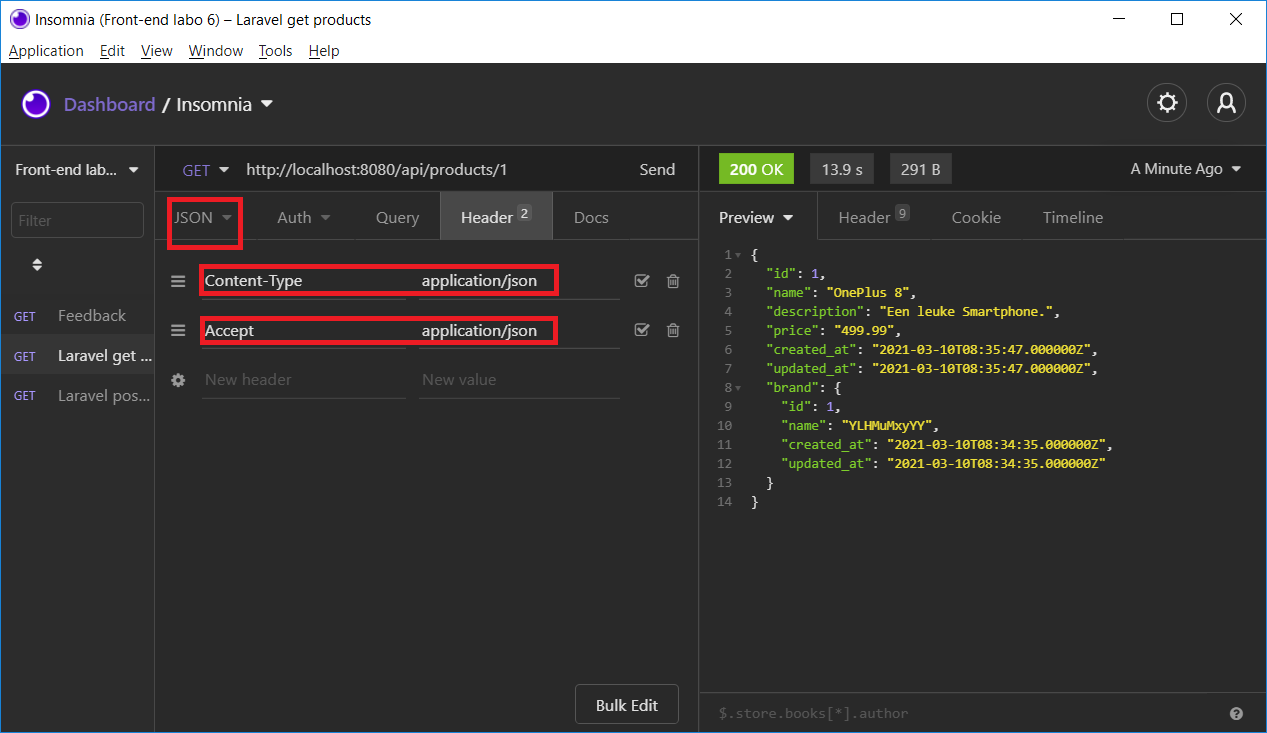
- Use a Web API testing tool such as Postman or Insomnia
- The
Accept: application/jsonheader is very important to Laravel: if you don't indicate you expect JSON, Laravel will send you back HTML pages -
The
Content-Type: application/jsonheader is required when your request contains JSON in the body. If you don't set it, Laravel won't be able to parse the JSON and your$requestdata will be empty
Web API routing
-
Want to offer a stateless API?
Enable API routing and API authentication by
php artisan install:api* -
Put all your Web API routes in
routes/api.php**- The routes in this file are assigned the prefix
/api/** !!! - Web API communication is assumed to be stateless, so the middlewares applied to
routes/api.phpare different from those applied toroutes/web.php
(there is no session control, cookie encryption nor CRSF protection, but there is API throttling in stead) - You actually ± know how to program Web API endpoints:
just continue using Controllers, Validation, Eloquent, …
- The routes in this file are assigned the prefix
Will this work?
- Let's define in
routes/api.php
Route::get('/products/{id}', function (string $id): array {

    $product = Product::findOrFail($id);

    return ['title' => $product->title, 'id' => $product->id];

})->where('id', '[0-9]+');-
Yes! This will work.
- Laravel will automatically convert an array into a JSON resonse (with the correct
Content-Typeheader) - However … this approach becomes problematic as your application grows (less maintainable/reusable)
- Laravel will automatically convert an array into a JSON resonse (with the correct
-
In the next slides, we'll see 2 better approaches:
- Eloquent Serialization (better)
- Eloquent API resources (best)
Error Messages
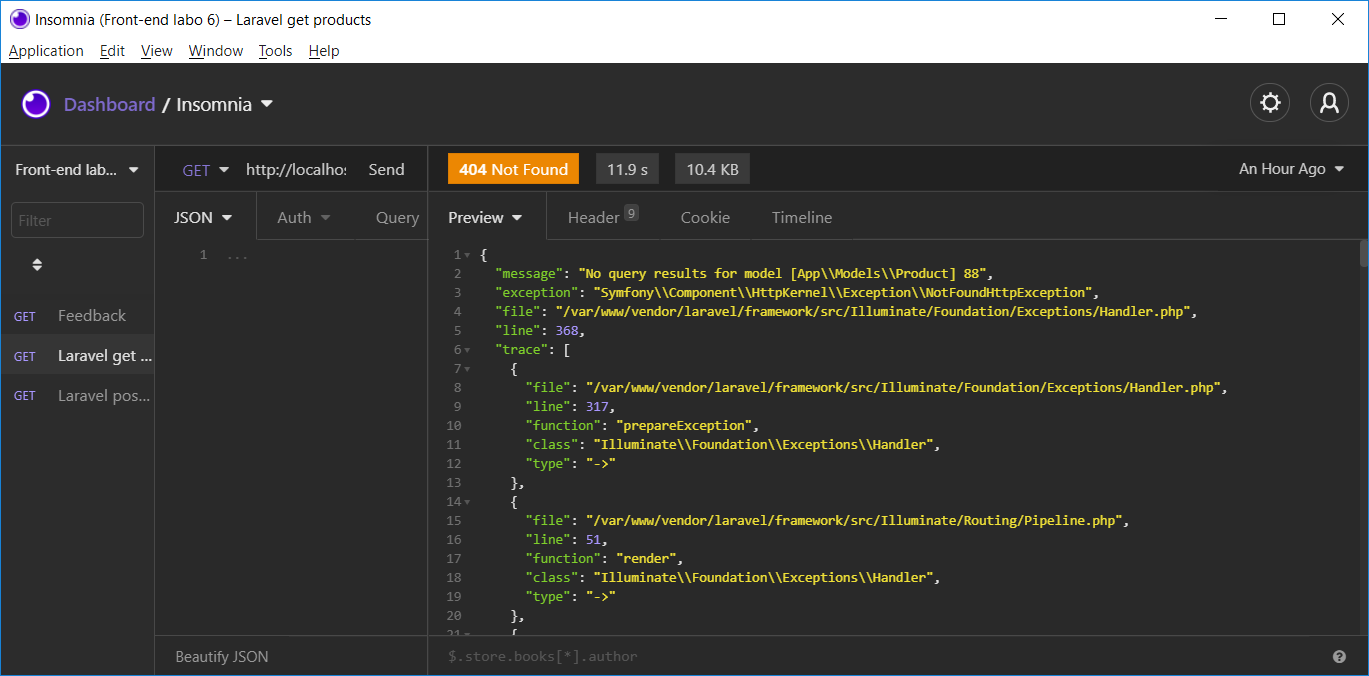
- Often have the correct HTTP status code
- Are only in JSON when the request contains the
Accept: application/jsonheader - Do not contain the full stack trace when
APP_DEBUG=falsein.env
06.3
Eloquent Serialization
A Very First Example
- Let's define in
routes/api.php
Route::get('/products/{id}', function (string $id): Product {

    $product = Product::findOrFail($id);

    return $product;

})->where('id', '[0-9]+');- When the product exists, the Eloquent model object
$productwill automatically be serialized into JSON ($product->toJson()) and converted into aResponseobject
(withContent-Type: application/json) - When the product doesn't exist,
findOrFail()launches aNotFoundHttpExceptionresulting in a JSON*-like404response
Demo v1 with Postman
use App\Models\Product;
use Illuminate\Database\Eloquent\Collection;

Route::get('/v1/products/{id}', function (string $id): Product {

    $product = Product::findOrFail($id);

    return $product;
})->where('id', '[0-9]+');

Route::get('/v1/products', function (): Collection {

    return Product::all();
});
Eloquent Serialization (1)
- Eloquent Serialization determines how exactly the eloquent model is converted into JSON
- Use
$hiddenin the Eloquent model class to exclude properties:
class Product extends Model
{
    protected $hidden = ['user_id', 'brand_id'];
...-
Likewise, in the Eloquent model class,
protected $visiblecan be used if you prefer an allow list in stead of$hiddenprotected $appendscan be used to define a list of accessor properties to be included- date formats can be altered in
protected $casts
Eloquent Serialization (2)
- Demo v1, revisited
class Product extends Model
{
    protected $hidden = ['user_id', 'brand_id'];
    protected $appends = ['code'];

    protected function code(): Attribute
    {
        return Attribute::make(
            get: fn (mixed $value, array $attributes) => 'P'.sprintf('%06d', $attributes['id']),
        );
    }

    protected function casts(): array
    {
        return [
            'created_at' => 'datetime:Y-m-d H:m:s',
            'updated_at' => 'datetime:Y-m-d H:m:s',
        ];
    }
    ...
Eloquent Serialization (3)
- Only loaded relationships are (resursively) converted to JSON (unless listed in
$hidden)
Route::get('/products/{id}', function (string $id): Product {

    $product = Product::with('brand')->findOrFail($id);

    return $product;

})->where('id', '[0-9]+');- You can still override some attribute settings "at run-time":
$product->makeVisible('user_id')
$product->makeHidden('price')
$product->append('html_description')- Or override all attribute settings "at run-time":
$product->setVisible(['name', 'description']])
$product->setHidden(['created_at', 'updated_at', 'price'])
$product->setAppends(['code', 'html_description'])
Wrapping
- Remember that error response? It was inside a
messagefield of a JSON object - Some API consumers prefer a uniform response structure
⟶ always return a single JSON object with fields likemessage,dataandmeta
Route::get('/products/{id}', function (string $id): array {

    $product = Product::with('brand')->findOrFail($id);

    return ['data' => $product];

})->where('id', '[0-9]+');
Demo v2: a CRUD Example
Route::get('/v2/products/{id}', function (string $id): array {

    $product = Product::with('brand')->findOrFail($id);
    return ['data' => $product];

})->where('id', '[0-9]+');

Route::get('/v2/products', function (): array {

    return ['data' => Product::with('brand')->get()];
});

Route::post('/v2/products', function (Request $request): array {

    $request->validate([
        'name' => 'required|unique:products|max:125',
        'price' => 'required|numeric|min:0.10',
        'description' => 'required',
        'brand_id' => 'required|exists:brands,id'
    ]);
    $product = new Product($request->all());
    $product->save();
    return ['message' => 'The product has been created'];
});Exercise
- In almost any endpoint, when a book is returned as JSON, the book should contain
- the fields
id,isbnandtitle(these are columns in the DB) - the field
internal_code(which is a concatenation of the book'sidandlocationcolumns) - the related author's JSON
- the fields
- Which 4 things should be added to the model class Book?
- In 1 endpoint, the book should contain the
descriptioncolumn in stead ofisbn. How can this be overridden?
06.4
Eloquent API Resources
Introduction
- In certain situations, defining one single JSON response per Eloquent model is not satisfactory
- Eloquent API Resources form a transformation layer between your Eloquent models and JSON responses
- You will define
Resourceclasses, defining a transformation between an Eloquent model and a JSON response
Creating a Resource
-
How to create such a transformation?
php artisan make:resource ProductResource -
⟶ a resource class is created in
app/Http/Resources
⟶ intoArray($request), include all attributes for this transformationclass ProductResource extends JsonResource { /** * Transform the resource into an array. * * @return array<string, mixed> */ public function toArray(Request $request): array { return [ 'id' => $this->id, 'name' => $this->name, 'price' => $this->price, 'brand' => new BrandResource($this->brand), 'categories' => CategoryResource::collection($this->categories), ]; } }
Creating a Resource Collection
- You don't need to if you have a regular collection!
-
How to create a transformation for collections of models?
class name ending onphp artisan make:resource ProductCollectionCollectionor add the flag--collection -
⟶ a resource collection class is created in
app/Http/Resources
⟶ intoArray($request), define how you want your collection to be transformedclass ProductCollection extends ResourceCollection { /** * Transform the resource collection into an array. * * @return array<int|string, mixed> */ public function toArray(Request $request): array { return [ 'data' => $this->collection, 'links' => [ 'self' => 'link-value', ], ]; } }
Basic Usage
-
Example in your
routes/api.phpuse App\Http\Resources\ProductResource; use App\Models\Product; Route::get('/v3/products/{id}', function (string $id): ProductResource { return new ProductResource(Product::findOrFail($id)); }); Route::get('/v3/products', function (): ProductCollection { return new ProductCollection(Product::all()); // or, if you don't have a ProductCollection: // return ProductResource::collection(Product::all()); }); - By default, all data is wrapped in a
datakey (configurable) - When passing a paginated result, the response contains
metaandlinkskeys describing the paginator's state - Read more about conditional attributes and conditional relationships
06.5
Sidenote: Resource Controllers
Hint: Resource Controllers
- Again: you'd better put your code in controllers, having 1 controller per resource
- The methods and structure of these controllers and corresponding routes will be very similar
- Streamline your controllers with Resource Controllers
"Web" Resource Controllers
-
Assign all your CRUD routes to a controller in a single line of code
- Generate the controller:
$ php artisan make:controller PhotoController --resource - Register the routes:
Route::resource('photos', PhotoController::class); // chain methods like only(), except() - Result:
Check this out with:Verb URI Action Route Name GET /photosindex photos.index GET /photos/createcreate photos.create POST /photosstore photos.store GET /photos/{photo}show photos.show GET /photos/{photo}/editedit photos.edit PUT/PATCH /photos/{photo}update photos.update DELETE /photos/{photo}destroy photos.destroy php artisan route:list - In a web app, you will need to spoof the methods DELETE, PUT and PATCH
- Generate the controller:
"API" Resource Controllers
-
Assign all your CRUD routes to a controller in a single line of code
- Generate the controller:
$ php artisan make:controller PhotoController --api - Register the routes:
Route::apiResource('photos', PhotoController::class); // chain methods like only(), except() - Result:
Check this out with:Verb URI Action Route Name GET /photosindex photos.index POST /photosstore photos.store GET /photos/{photo}show photos.show PUT/PATCH /photos/{photo}update photos.update DELETE /photos/{photo}destroy photos.destroy php artisan route:list - Extend with Nested Resources
- Generate the controller:
06.6
Web API Documentation
Web API Documentation
- Technical document containing instructions how to effectively use a Web API
- Concise but containing all information required to work with the Web API
- Typically: web doc automatically generated from code (annotations)
- Why is it important? Better dev experience, so better adoption of your Web API, save support time, …
⟶ let's have a look at Swagger UI, generating documentation from OpenAPI specs
Web API Documentation Systems
-
Annotation-based
- generate from Open API docblocks in your code with packages like L5-swagger (tutorial)
- generate from PHPDoc docblocks in your code with vyuldashev/laravel-openapi
- Not Open API: Scribe
- Not Open API: ovac/idoc
- Code analysis (automatic)
-
Contract-first
- DIY with a tool like Stoplight Studio
- DIY with Swagger Editor
-
Documentation renderers
- Swagger UI
- ReDoc
- Scalar