Web Frameworks [OGI06i]
03. Let's MVC
with Eloquent
03.1
Introducing MVC
MVC
- Short for Model-View-Controller
- Architectural pattern describing how to build your app
-
In a web-context:
- The model represents data
- The view visually represents the model
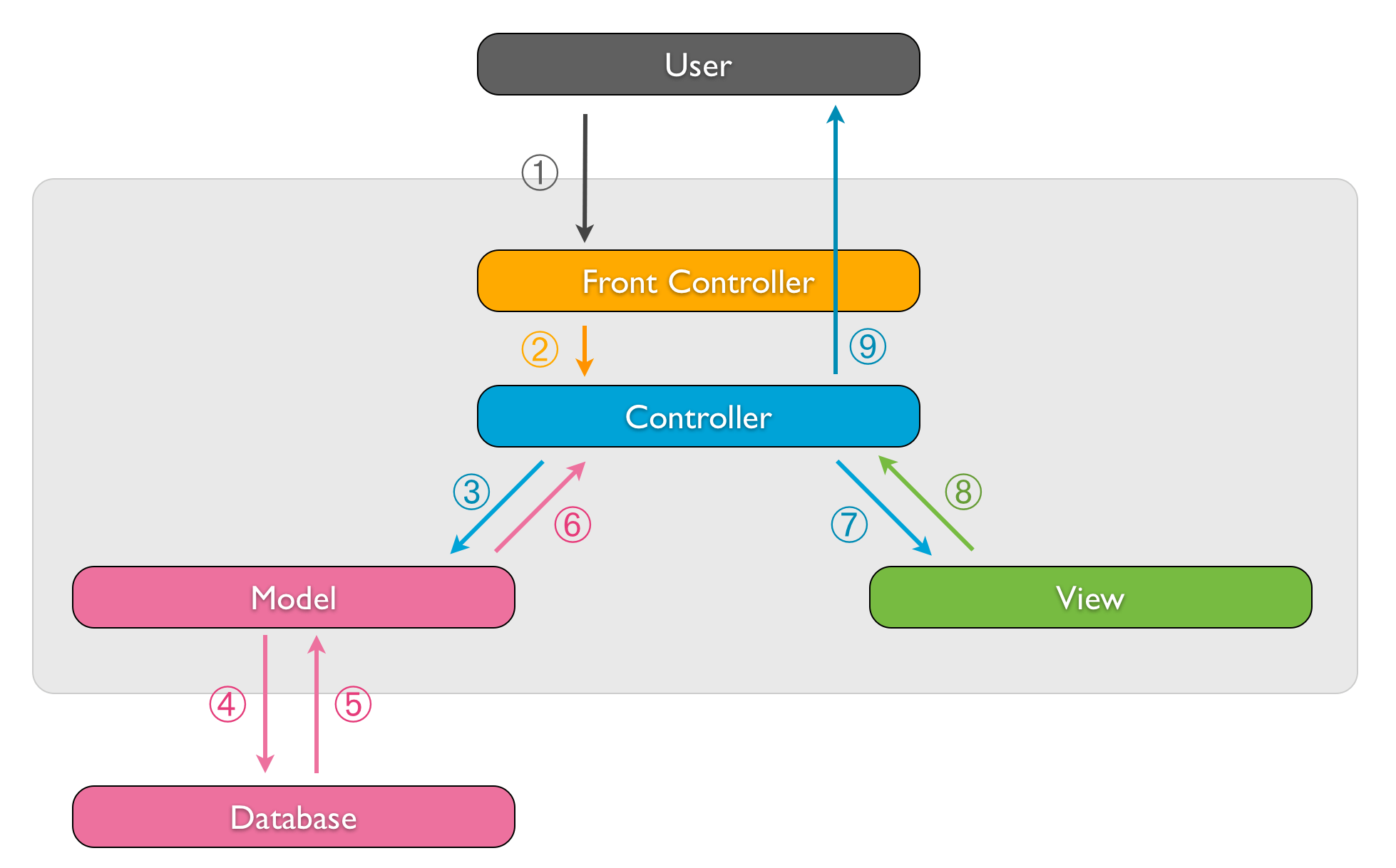
- The controller is the app logic: decides what the input was, and orchestrates the proper models/views
- This presentation is about structuring our Laravel code into MVC
Schematic
03.2
Introducing ORM
ORM
- Short for Object-Relational Mapping
-
Connect data in the DB with objects in an object-oriented programming environment
- Enables programming with a virtual object database
- Example: one entry (= row) of the table
customerscorresponds with one instance of theCustomerclass - Abstraction of SQL level results in less and clearer code
- Typically implemented as a (part of a) library
Active record pattern
-
Active record pattern
- This means that an object instance is tied to a single row in the table
- After creation of an object, a new row is added to the table upon save
- An update of the object results in a row update
- The class has a property or getter method for each column
Example
$todos = Todo::all();
print_r($todos);

echo $todos[0]->what;

$todo = new Todo();
$todo->what = 'Go lunching !!';
$todo->priority = 'high';
$todo->save();

print_r(Todo::all());
$todo->delete();
print_r(Todo::all());-
How could this be implemented in plain PHP? ⟶ let's have a look at
public/slides/assets/02/examples/simple-mvc/01.phpwith aTodoclasspublic/slides/assets/02/examples/simple-mvc/02.phpwith a genericModelclass- Many features missing: dynamic PK, FKs, code safety and type checking,
WHERE,GROUP BY, ...
-
Laravel's Eloquent ORM
- implements all of these features
- … but we'll first need to get acquainted with Query Builder
03.3
Query Builder
Query Builder (1)
-
Fluent interface for building SQL queries (docs)
- Always start with
DB::table() - and use chained methods to filter/select/aggregate data
- Automatic prevention against SQL injection
- At the end of the chain:
get()returning a Collection of results$users = DB::table('users')->get(); dump($users);- which you can still loop with
foreach - where a result is an instance of PHP's base class having its columns accessible through properties
foreach ($users as $user) { echo $user->name; } - which you can still loop with
- Always start with
Query Builder (2)
-
Fluent interface for building SQL queries (docs)
- example with
select(),where()andgroupBy()$users = DB::table('users') ->select('name', 'email as user_email') ->where('status', '<>', 1) ->groupBy('status') ->get();select(),where(),groupBy()return a Builder object$where = DB::table('users') ->select('name', 'email as user_email') ->where('status', '<>', 1); dump($where);get()is the only method actually performing a query here !
- example with
Query Builder (3)
-
Methods running the database query
get()returns a collection of all matching rows (as you already know)first()returns a single row$user = DB::table('users')->where('name', 'John')->first(); echo $user->name;find()retrieves a single row by the specified value for theidcolumn$user = DB::table('users')->find(3);value()returns a single value$email = DB::table('users')->where('name', 'John')->value('email');pluck()returns a Collection of custom keys and values$events = DB::table('event')->pluck('name', 'id'); foreach ($events as $id => $name) { …
Query Builder (4)
-
Chain a multitude of QB methods (docs)
- aggregate methods e.g.
count(),max() - much more e.g.
whereIn(),orWhere(); joins e.g.leftJoin(),on(); offset and limit withskip()andtake(); chunking results withchunk() - Examples with
insert(),update()anddelete()$id = DB::table('users')->insertGetId( ['email' => 'john@example.com', 'votes' => 0] ); DB::table('users') ->where('id', 1) ->update(['votes' => 1]); DB::table('users')->increment('votes', 5); DB::table('users')->where('votes', '<', 100)->delete(); DB::table('flights')->upsert([ ['departure' => 'Oakland', 'destination' => 'San Diego', 'price' => 99], ['departure' => 'Chicago', 'destination' => 'New York', 'price' => 150] ], ['departure', 'destination'], ['price']);
- aggregate methods e.g.
03.4
Eloquent ORM
Defining the models (1)
- ORM: ± each database table has a corresponding "Model" which is used to interact with (Eloquent docs)
-
First step: generate the models with Artisan (! uppercase & eng. singular)
$ php artisan make:model Event- It generates the (pretty empty) class
EventextendingIlluminate\Database\Eloquent\Modelin theapp/Models/directory - By now, the model assumes that there is a table
events(! lowercase & eng. plural) in the database
- It generates the (pretty empty) class
Defining the models (2)
-
app/Models/Event.php<?php namespace App\Models; use Illuminate\Database\Eloquent\Model; class Event extends Model { // }
Defining the models (3)
-
Next step: mark unexpected table characteristics in your model
app/Models/Event.php- The model assumes that there is a table
events(plural!) in the database, unless you addprotected $table = 'my_other_table_name'; - The model assumes the table has an (auto-increment) (integer) primary key called
id, unless you addprotected $primaryKey = 'event_id'; public $incrementing = false; protected $keyType = 'string';
- The model assumes that there is a table
Defining the models (4)
-
Next step: mark unexpected table characteristics in your model
- The model assumes that the table has
created_atandupdated_atcolumns, unless you addpublic $timestamps = false;- Eloquent will automatically update these columns when creating/changing data
- Raw SQL Queries won't
- You don't need to add any information on the columns, but you can specify default attribute values if you want
protected $attributes = [
   'delayed' => false,
];
- The model assumes that the table has
Retrieving data
-
From now on, you can filter/select/aggregate data using the model
- Eloquent's
all()returns all records in the tableuse App\Models\Event; foreach (Event::all() as $event) { echo $event->name; } - Rely on Query Builder for many other (chained) methods
$events = Event::where('active', 1)
           ->orderBy('name', 'desc')
           ->take(10)
           ->get();
- Eloquent's
Find or fail
-
Retrieving single records with Eloquent's
find()andfirst()use App\Models\Event; $event15 = Event::find(15); // retrieval by primary key $activeEvent = Event::where('active', 1)->first(); // retrieve the first record $activeEvent = Event::firstWhere('active', 1); // same- Throw a
ModelNotFoundExceptionwhen no result is found:$event15 = Event::findOrFail(15); $activeEvent = Event::where('active', 1)->firstOrFail(); - Results in a
404HTTP response when not caught (!)
- Throw a
What does Eloquent return?
- Actually, Eloquent methods like
all()andget()return an Eloquent Collectionuse App\Models\Product; $products = Product::all(); dump($products);- Eloquent Collections inherit all capabilities from
Collections
e.g.$products->count(),$products->pluck('name'),$products->where('name', 'Oneplus')
but still remember their DB retrieval context (primary key, columns, etc.)
e.g.$products->find(1)
- Eloquent Collections inherit all capabilities from
Collections
- Individual "row" results are model instances: objects of the model class (e.g.
class Product extends Model) you generated with Artisan$product = Product::find(1); dump($product);
Builder object or DB query result?
-
Static methods directly causing a DB query yielding a result
Event::all() // returns an Eloquent collection of Event objects Event::find(15) // returns an Event object Event::findOrFail(15) // returns an Event object Event::count() // returns an integer -
Static methods returning a Builder object (you are just building a query!)
Event::where('active', 1) Event::select('id', 'name') -
Chaining of Builder methods, returning the very same Builder object
$events = Event::where('capacity', '>', 315)->where('active', 1)->select('id', 'name')->orderBy('capacity', 'desc'); -
Methods transforming a Builder object into a result (executing a DB query)
$events->get()         // returns an Eloquent collection of Event objects
$events->count()       // returns an integer
$events->first()       // returns an Event object
$events->find(15)      // returns an Event object
$events->value('name') // returns a value
$events->pluck('name') // returns an Eloquent collection of strings
Active record
-
You can insert, update and delete rows correspondingly to the active record pattern
use App\Models\Event; $event = new Event; $event->name = $request->name; $event->save(); $event = Event::find(1); $event->name = 'Pukkelpop 2024'; $event->save(); $event->delete();- Note: alternately, you can do the same stuff with mass-assignment (see the slide after next) … - by the way Eloquent also enables deletion by PK:
Event::destroy(7);
Fresh, clean and dirty
-
Refreshing models
$event = Event::where('name', 'Pukkelpop 2024')->first(); $freshEvent = $event->fresh(); // reload from DB and create new Event object $event->price = 280; $event->refresh(); // reload from DB and "re-hydrate" existing Event object $event->price; // 200 -
Examining attribute changes
$event = Event::where('name', 'Pukkelpop 2024')->first();

$event->price = 280;
$event->isDirty(); // true
$event->isDirty('price'); // true
$event->isDirty('name'); // false
$event->isDirty(['price', 'name']); // true
$event->isClean('price'); // false

$event->save();

$event->isDirty(); // false
$event->isClean(); // true
Mass-assignment vulnerability (1)
-
Mass assignment
- Definition: use a method that accepts a list of column-value pairs to create/edit a model instance
$user = User::create(['name' => 'Franky Pallemans', 'company' => 'Cynalco']); // does a DB INSERT - It enables to pass all parameter/value-pairs of the HTTP request's querystring to the create method (think of … a registration form)
$user = User::create($request->all()); - Mass-assignment vulnerability: a malicious user adds a parameter to the HTTP request e.g.
role=administratorwhich is passed to the create method
- Definition: use a method that accepts a list of column-value pairs to create/edit a model instance
Mass-assignment vulnerability (2)
-
Mass assignment vulnerability protection
- It is required to
- blacklist:
protected $guarded = ['role']; - or whitelist:
protected $fillable = ['name', 'company'];→ our choice
- blacklist:
- Attention: when you pass a blacklisted/not-whitelisted attribute to a ‘vulnerable’ method
- You don't get an error: these attributes are silently discarded*
- It only applies to vulnerable methods so you can still
$user->role = 'administrator';
$user->save();
- It is required to
More mass-assignment methods
-
Model constructor with parameter
use App\Models\Event; $event = new Event(['name' => 'Pukkelpop 2025']); -
Apply
fill()on a model instance$event = new Event; $event->fill(['name' => 'Pukkelpop 2025']); -
Mass updates
Event::where('price', '>', 300)->update(['active' => 0]); -
Conditional creation
// Retrieve the event by the attributes, or create it if it doesn't exist...
$event = Event::firstOrCreate(['name' => 'Dranouter 2024']);

// Retrieve the event by the attributes, or instantiate a new instance...
$event = Event::firstOrNew(['name' => 'Dranouter 2024']);
$event->save();

// If there's a matching event, set the price to $99.
// If no matching event exists, create one.
$event = Event::updateOrCreate(['name' => 'Dranouter 2024'], ['price' => 99]);

// Same for multiple rows? use Event::upsert()
Eloquent relationships (1)
-
One-to-many example
- Suppose a 1:n relation between users and tasks → table tasks has a foreign key column
user_id - Instead of working with FKs in Laravel, you want to interact with the related objects directly
$user = User::find(1);

foreach ($user->tasks as $task) {
    echo $task->name;
}
- Suppose a 1:n relation between users and tasks → table tasks has a foreign key column
Eloquent relationships (2)
-
Bidirection support 1:n
- Add to the
Userclass: (! plural)public function tasks(): HasMany { return $this->hasMany(Task::class); } - Add to the
Taskclass: (! singular)public function user(): BelongsTo { return $this->belongsTo(User::class); } - Read the docs on Eloquent relationships to learn about other types of relationships
- Add to the
Eloquent relationships (3)
-
How to use these relationships?
-
$user->tasksreturns an Eloquent Collection of Task objects (data)
→ keep on chaining -
$user->tasks()returns a (Query) Builder object
→ keep on chaining
→ master relations with create(), save() and associate()
-
-
⟶ Let's have a look at
many-to-many relationships and
how to update them
remember: never make a separateModelclass for the intermediate (= pivot) table
Eloquent with dates and times
-
As you know, Laravel comes with Carbon
use Carbon\Carbon;- The Carbon class extends the PHP DateTime class
- You can use it as part of a query
$events = Event::where('event_date', '<', new Carbon('yesterday 23:10'))->get(); - In order to have a Carbon object auto-casted at any time in Eloquent, you need to tell Eloquent first
class Event extends Model { protected function casts(): array { return [ 'event_date' => 'datetime', // you don't need to mention created_at and updated_at here! ]; } } - Now you can do things like
$event->event_date = Carbon::now(); - Actually, with
$castsyou can define many cast types in order to have your attributes auto-converted
Inspecting Models
-
Want a complete overview of a model's available attributes and relationships?
php artisan model:show Event
03.5
MVC recap
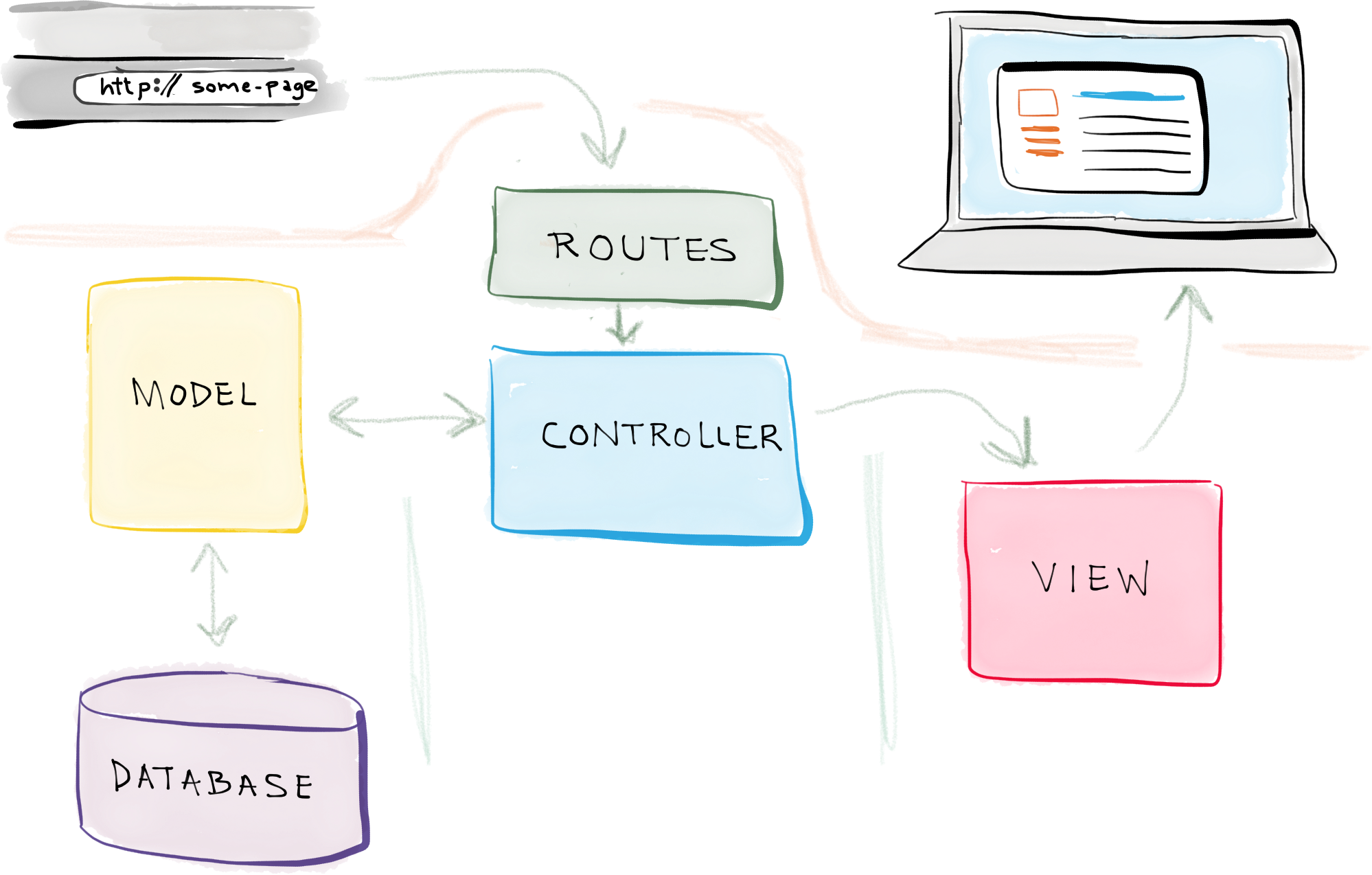
MVC in Laravel: overview
Source: selftaughtcoders.com
MVC in Laravel: overview
- Models: generate Eloquent models with Artisan
- Views: store your Blade (or PHP) templates in
resources/views - Controllers: see next slide(s)
03.6
HTTP Controllers
HTTP Controllers (1)
- Create a
*Controllerin the folderapp/Http/Controllersphp artisan make:controller TaskController -
Point to its methods in
/routes/web.php(or in/routes/api.php)use App\Http\Controllers\TaskController; Route::get('/tasks', [TaskController::class, 'index']); Route::post('/tasks/create', [TaskController::class, 'store']); Route::post('/tasks/{task}/delete', [TaskController::class, 'destroy'])->whereNumber('task'); -
Write the appropriate method(s) in
*Controllerclass TaskController extends Controller { public function index(Request $request): View { $tasks = Task::where('user_id', $request->input('user_id')) ->orderBy('created_at', 'asc') ->get(); return view('tasks.index', ['tasks' => $tasks]); } public function destroy(Request $request, string $id): RedirectResponse
HTTP Controllers (2)
-
Only include the (type-hinted) $request parameter when needed
class TaskController extends Controller { public function index(): View { return view('tasks.index'); } -
Implicit model binding: Eloquent will use the
idcolumnRoute::post('/tasks/{task}/delete', [TaskController::class, 'destroy']);class TaskController extends Controller { … // Task $task: implicit model binding (on ID) + 404 on fail public function destroy(Task $task): RedirectResponse { $task->delete(); return redirect('/tasks'); }
Generating all classes together
-
Typical flow
# start from an empty DB

# creates  model + create_products_table migration + ProductSeeder + ProductController
$ php artisan make:model Product -msc

# migration contains: $table->id();
# migration contains: $table->timestamps();
# add to your migration: other columns

$ php artisan migrate

# add data to your seeder

$ php artisan db:seed --class=ProductSeeder

# add to your model: mass-assignable blacklist/whitelist and dates/times

# use App\Models\Product wherever you want for your DB operations from your ProductController
03.7
Concluding demo
Concluding demo
- Let's start from a DB schema for a webshop
- products (id🔑, name, description, price, brand_id)
- brands (id🔑, name)
- categories (id🔑, name)
- category_product (category_id🔑, product_id🔑)
- Let's craft the migrations and seeders ⟶
- Let's generate the Eloquent models including
$fillableand all relationships ⟶ - Let's try Eloquent in a simple ProductController ⟶
Eloquent demo (1)
    // retrieve product (data record) with ID 1
    $product = Product::find(1);
    dump($product->name);
    dump($product->price);

    // retrieve the product's brand (data record) through many-to-one
    $brand = $product->brand;
    dump('brand: ' . $brand->name);

    // retrieve the product's categories (collection of data records) through many-to-many
    $categories = $product->categories;
    foreach ($categories as $category) {
        dump('category: ' . $category->name);
    }

    // retrieve all products (collection of data records)
    $products = Product::all();
    dump('# products: ' . $products->count()); // count of collection
    dump('# products: ' . Product::count());   // count in DB query (faster!)
Eloquent demo (2)
    // retrieve all products of brand 1
    $productsOfBrandOne = Product::where('brand_id', 1)->orderBy('price', 'desc')->get();
    dump('all products of brand 1 ---');
    dump($productsOfBrandOne->pluck('name', 'id')); // pluck of collection
    dump($productsOfBrandOne->pluck('name', 'id')->all()); // ... as a plain array
    dump(Product::where('brand_id', 1)->orderBy('price', 'desc')->pluck('name', 'id')); // pluck integrated in DB query


    // retrieve all products of category 2
    dump('all products of category 2 ---');
    $id = 2;
    dump(Category::find($id)->products->pluck('name')); // v1: involves 2 DB queries (key in collection is 0 !)
    dump(Category::find($id)->products()->pluck('name')); // v2: still 2 DB queries ...

    // v3: involves only 1 DB query
    $productsOfCategoryTwo = Product::whereHas('categories', function (Builder $query) use ($id) {
        $query->where('id', $id);
    })->get();
    dump($productsOfCategoryTwo);

    // v4: shorter, with whereRelation
    dump(Product::whereRelation('categories', 'id', $id)->get());
Eloquent demo (3)
    // add a new product of brand 1
    $brand1 = Brand::find(1);
    $apple = new Product;
    $apple->name = 'Jonagold';
    $apple->description = 'Just a piece of fruit';
    $apple->price = 0.85;
    $apple->brand()->associate($brand1);
    $apple->save();

    // add another new product of brand 1 in one line
    $brand1->products()->create(['name' => 'Pink Lady', 'description' => 'Just a piece of fruit', 'price' => 0.85]);
    // yes ... you just saw a mass-assignment
Eloquent demo (4)
    // product checkup: find products without category or price 0.00
    dump('faulty products ---');
    $faultyProductsBuilder = Product::where('price', 0.00)->orDoesntHave('categories');
    $faultyProductStrings = $faultyProductsBuilder->get()->map(function ($product) {
        return $product->id . '. ' . $product->name . ' (' . $product->price . '€)';
    });
    dump($faultyProductStrings->all());

    // Let's add both categories to the first faulty product
    $faultyProductsBuilder->first()?->categories()->sync([1, 2]); // ?-> null-safe operator

    // ... and delete all apples anyway
    Product::where('price', 0.85)->delete();